Staff / Settings / OpenStack Plans
An OpenStack pricing plan is a collection or prices (rules with prices) for individual resources such as instances, volumes, images or network bandwidth
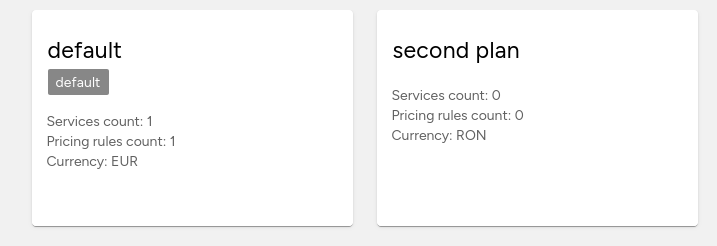
OpenStack plan list
This page displays your current pricing plans and allows you to manage them.
Creating a new pricing plan
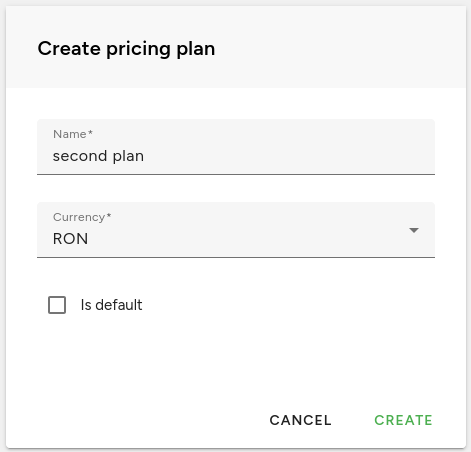
To create a new plan click the button from the bottom right corner of the screen.

The following modal window will pop up, and you’ll be able to choose:
Name: The name associated with the plan
Currency: The currency that the pricing plan will use
Is default: When a new default billing plan is set it will apply for newly created clients. It does not change for existing clients.
You must always have at least one pricing plan defined but Fleio allows you to create additional ones.
The default plan applies to all customers by default, and you can define additional pricing plans for various customer categories. For instance, you can to define discounts and use a different currency for a subset of customers.
The currency is selected per plan and applies for all pricing rules in that plan.
Note
A client is always invoiced using his default currency. The exchange rate will be applied to the amount determined by the pricing rules (if the client’s currency is different from the plan’s currency).
Deleting a plan
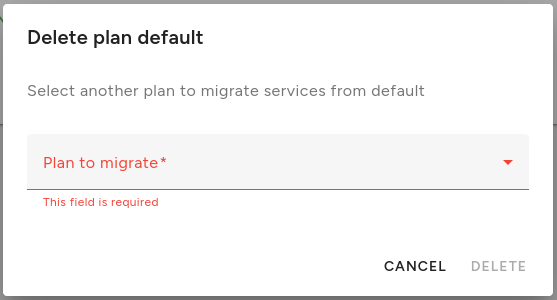
Click the Delete plan icon when hovering over a plan or enter its details page and hover over the action button. If you delete a plan used by some services, you’ll need to select another one to migrate the services using the OpenStack plan you are deleting.
OpenStack pricing plan details
The pricing plan details page lets you view the rules for your selected plan and make adjustments to them.
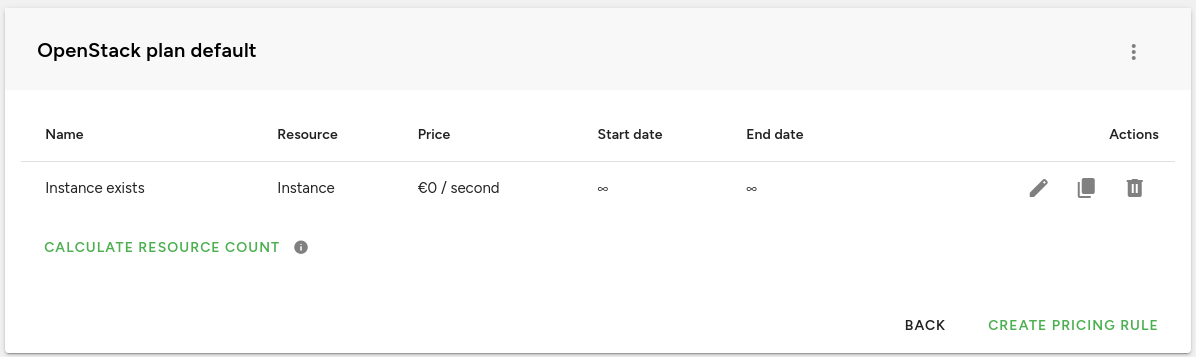
Right now you can create pricing rules for the following resource types: instances, images, volumes, network (project traffic), Swift object storage, instance traffic, Ceph object storage, volume snapshots, volume backups, floating IPs, DNS domains, instance IPs, load balancers, database instances and routers.
More resources may be added in future Fleio releases.
Pricing rules
To create a new pricing rule, click the (+) button either from the OpenStack plan details page or the OpenStack plans page when hovering an item. You’ll get redirected a new page with the following form that will be explained below.
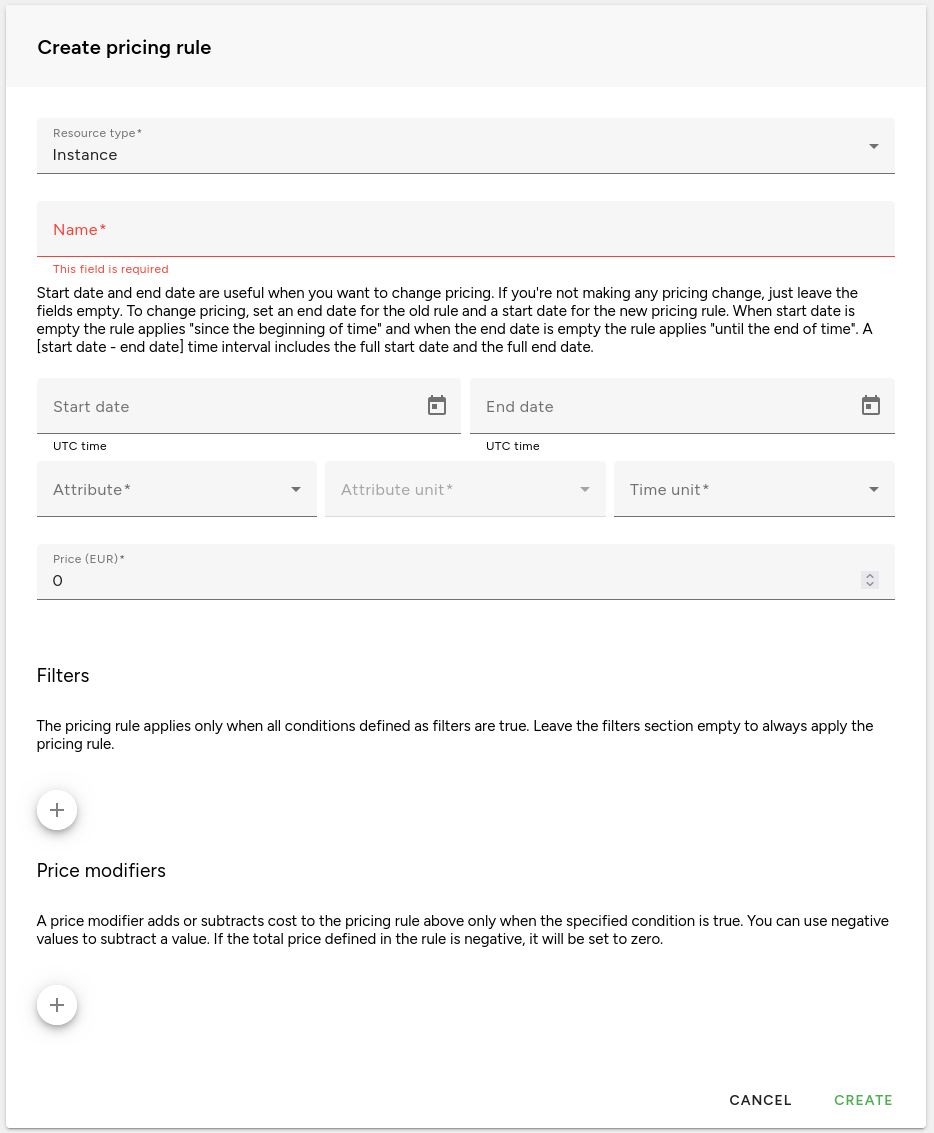
One plan includes several pricing rules, each with its own set of filters and modifiers. The currency set for the billing plan is used for all pricing rules in that plan.
OpenStack resource type and data collection method
Each pricing rule must be defined on a type of resource (e.g. instance, volume, floating ip, etc.). The data collection method for each resource type might be different, and you can find it in the following table:
Resource type |
Data collection method |
|---|---|
Instance |
OpenStack notifications |
Image |
OpenStack notifications |
Volume |
OpenStack notifications |
Network (data traffic per project) |
Gnocchi |
Swift Object storage |
Gnocchi |
Instance traffic |
Gnocchi |
Ceph object storage |
Gnocchi |
Volume snapshot |
OpenStack notifications |
Volume backups |
OpenStack notifications |
Floating IPs |
OpenStack notifications |
DNS Domains |
OpenStack notifications |
Instance IPs |
OpenStack notifications |
Load balancer |
OpenStack notifications |
Database instance |
OpenStack notifications |
Router |
OpenStack notifications |
Common pricing rules Features
- Pricing rules are not exclusive:
multiple rules can apply to the same cloud resource and the price outcome of each rule will be added to the total price.
The pricing rule Name is display in billing history details.
The Start date and End date fields
- The Pricing attribute is used to determine what to charge for.
For example, in case of an Image, a Pricing Attribute set to size will calculate the price based on the Image size. If the Pricing Attribute would be set to existence, then the price of an image of any size would be set.
- The Unit can be set for specific attributes like memory_mb or any attribute that can be converted to a different
size. If you want to charge an instance per GB of memory, you would set the Pricing attribute to memory_mb and the Unit to Gigabytes.
Example: Charge $1 per 2GB of Instance RAM/Hour translates to Pricing attribute set to memory_mb, Unit set to Gigabytes, Time unit set to Hour and price set to 1, assuming the Plan currency is USD.
- The Time unit sets the unit of time the price is for. As an example, a time unit
of hour and the Pricing attribute set to existence means the price is set for every hour the instance exists in the cloud.
- The total price for a rule may end up being negative, especially when negative modifiers are used for discounts.
Fleio deals with these prices by setting them to zero. This can be controlled from the Fleio settings.py file by setting OSBILLING_NEGATIVE_PRICE_ALWAYS_ZERO to False (see Allowing negative rule prices) if you want negative prices (increasing your client’s credit balance in time) or True, which is the default, to always set negative prices to zero.
- A rule’s total price can sometimes become zero or almost zero.
To prevent this, Fleio provides the OSBILLING_MINIMUM_PRICE_PER_RULE setting, which lets you set a minimum price threshold for each rule.
Filters
Pricing rules are by default applied to all resources of a type. To limit the scope of a pricing rule to a subset of resources, filters should be applied.
Typical filters are: instance_type is m1.small or volume_type is SSD.
For example, setting the filter instance_type is m1.small on an Instance pricing rule, will configure the pricing rule to only apply on instances with the m1.small flavor set.
Multiple filters can be added. The logical AND is used between them. In other words: the pricing rule only applies if all the filter conditions are true.
Price Modifiers
Price modifiers define additional cost added or subtracted to/from the rule’s base price.
For example, if you want to offer a discount of 10% for instances in a specific availability_zone you would create a modifier with the Attribute name set to availability_zone and the name of the availability zone desired, check the Price is percent checkbox and set the percent to -10 (as negative for discount).
If you instead would like to charge a fixed amount of $10 for each instance running Windows, you would create a modifier with the os_type attribute set to windows and a fixed price of 10USD and the Time unit set to hour.
Price modifiers can match a list of values when the resource attribute is a normal text.
For example, if you wish to match multiple instance names, you would select the display_name as the Attribute the In list or Not in list operator and for the value, each name should be separated by “,” as below:
vm1,vm2,vm3
Fleio offers autocomplete for most attributes when using In list or Not in list operators.
Instance pricing rules
Price can be applied on compute instances based on one of the following attributes:
existence: A price per Time Unit (second, minute, hour, billing cycle).
vcpu: The price per Time Unit is multiplied with the number of virtual CPU cores.
root_gb: The price per Time Unit is multiplied with the number of GB of the instance’s main disk.
memory_mb: The price per Time Unit is multiplied with the number of MB of the instance’s memory.
ephemeral_gb: The price per Time Unit is multiplied with the number of GB of the instance’s ephemeral disk size.
Filters can be used to limit the instances charged by the rule.
Instances filters
State filter
An OpenStack instance passes through several states in its lifetime.
You can define the list of states when you want the instance to be charged or list of states that you do not want to charge.
E.g. if you do not want to charge instances that are in building or error state, you can add a filter on the pricing rule and choose in the Add filter dialog Attribute name: state, Operator: Not in list and Value: building,error,stopped. Note that states are case-sensitive and must be all lower case.
Possible instance states that you can define filters on:
active
booted_from_iso - this is a Fleio specific state, not found in OpenStack
building
deleted - instance may appear temporary in this state in Fleio when it is being deleted
error
paused
rescued
resized
shelved
shelved_offloaded
soft-delete
stopped
suspended
WARNING: If you add a pricing rule filter for a state, like active, or for a list of states all other instance states will not incur cost for the end-user.
Instance type filter
Each instance is created using a flavor that specifies the resources (vCPUs, RAM and disk space) available to an instance.
You can filter instances by flavor by selecting instance_type attribute.
Other filters
Instances can be filtered using additional attributes. Below is a complete list of all available filter attributes with descriptions.
availability_zone - OpenStack availability zone for the instance
display_name - the name the user gave to the instance when it was created
launched_at - instance creation timestamp
vcpus - virtual CPUs allocated to the instances
root_gb - the size in gigabytes allocated for an instance’s root partition
memory_mb - the size in megabytes of instance’s allocated RAM
os_type - operating system type
instance_id - useful if you want to charge only a specific instance
tenant_id - the OpenStack project ID for this instance
host - the OpenStack hypervisor where this instance resides
has_boot_volume - true if instance is booted from volume
ephemeral_gb - the size in gigabytes allocated for an instance’s ephemeral storage
region - OpenStack region for the image
image_id - ID of the image used to create this instance
Image pricing rules
OpenStack Glance image storage can be priced on:
existence: A price per Time Unit (second, minute, hour, billing cycle) regardless of the size in GB.
size: The price per Time Unit is multiplied with the size of the image. You can select the Size Unit: Bytes, Kilobytes, Megabytes, Gigabytes, Terabytes, Petabytes.
Images filters
Images can be filtered using several attributes. Below is a complete list of all available filter attributes with descriptions.
size - the size of the image
created_at - creation timestamp for the image
updated_at - last change timestamp for the image
disk_format - image disk format
visibility - image visibility
status - image status
name - image name
region - OpenStack region for the image
Volume pricing rules
OpenStack Cinder volumes (also known as block devices) are priced on the same characteristics as images:
existence: A price per Time Unit (second, minute, hour, billing cycle) regardless of the size in GB.
size: The price per Time Unit is multiplied with the size of the volume. You can select the Size Unit: Bytes, Kilobytes, Megabytes, Gigabytes, Terabytes, Petabytes.
Volumes filters
Volumes can be filtered using several attributes. Below is a complete list of all available filter attributes with descriptions.
size - volume size
availability_zone - OpenStack availability zone for the volume
created_at - volume creation timestamp
volume_type - OpenStack volume type
- related_instance_flavor - filters on this attribute work only if the volume is attached to an instance, else the
filters are ignored
display_name - volume display name
region - OpenStack region for the volume
Network pricing rules
This rule applies to the number of GB that have passed through an L3 network.
Flat pricing means that the number of GB is multiplied with the Price per GB that is filled in.
Tiered pricing allows to set difference pricing depending on the volume of GB that is charged. For example, you can define that the first 1 000 GB cost 0.05 EUR per GB, the following GB up to 10 000 GB cost 0.045 EUR per GB, and the next GB (from 10 000 GB to infinite) cost 0.04 EUR.
You can also set the first tier to be free. I.e. the first 2500 GB are included at no cost. For example:
0 - 2500GB will be free 2500 GB - 5000 GB, 0.003 / GB 5000 GB - infinite, 0.006 / GB
If the client has 7000 GB of traffic he will be billed as following:
5000 GB (for the 2500 GB - 5000 GB tier) at 0.003 / GB (7.5 EUR)
2000 GB (for the 5000 GB - infinite tier) at 0.006 / GB (12 EUR)
Total billed for this instance will be 19.5 EUR (2500 GB at 0.003 / GB (7.5 EUR) + 2000 GB at 0.006 / GB (12 EUR)) .
NOTE How to configure OpenStack to support network bandwidth billing/accounting.
The neutron-metering-agent needs to be installed besides each neutron-l3-agent in order to support L3 networking accounting.
Follow the simple configuration for the metering agent: configure-metering-agent
Assuming we would like to account for the external traffic, we may want to create the following label with rules:
First create a shared label that will automatically be applied to all projects:
openstack network meter create --description Shared --share bandwidth
Create a rule for the bandwidth label to account for the packets leaving the project router
openstack network meter rule create --egress --remote-ip-prefix 0.0.0.0/0 bandwidth
Create another rule to account for the packets entering the project router
openstack network meter rule create --ingress --remote-ip-prefix 0.0.0.0/0 bandwidth
If we wish to exclude any destination we can add another rule together with the –exclude switch:
openstack network meter rule create --exclude --ingress --remote-ip-prefix 0.0.0.0/0 bandwidth
The above rule excludes all traffic going to 10.0.0.0/8
Assuming we have the Neutron L3 metering agent installed and the Ceilometer notification agent and Gnocchi and a Fleio pricing rule defined for bandwidth, the traffic accounting should start to display the cost for L3 networking in a few minutes.
Note
Rules on this resource have no filters.
Object storage/Ceph object storage pricing rules
This assumes that Ceilometer was set up to gather metrics correctly and send them to Gnocchi for further processing.
Fleio has support for Swift billing on the following metrics:
storage.objects.incoming.bytes - the total incoming network traffic in Gigabytes during a month
storage.objects.outgoing.bytes - the total outgoing network traffic in Gigabytes during a month
storage.objects - the average number of objects in a month is computed and the price is per object-month.
storage.objects.containers - the average number of object containers in a month is computed and the price is per container-month.
storage.objects.size - the average size in Gigabytes of all objects is computed during a month and the price is set per GB-month.
Fleio also collect the following metrics for CEPH object storage:
radosgw.api.requests - number of API requests against Ceph Object Gateway (radosgw)
radosgw.objects - number of objects
radosgw.objects.containers - number of containers
radosgw.objects.size - total size of stored objects
Notice the names of a few metrics: storage.objects.incoming.bytes, ..outgoing.bytes. Fleio will always rescale this values to Gigabytes.
As an example, say you would like to charge a customer for the total size used on Swift during one month with 31 days. Let’s assume the customer uses 10 GB of storage on the first 5 days of the month, 15 GB on the next 20 days and 20 GB on the last 6 days. Let’s also assume the price is set to $1/GB-month of storage. That would result in the following price calculation:
Price = (10 GB * 5 days + 15 GB * 20 days + 20 GB * 6 days) / 31 days * $1 = $15.16 for that month
Note
Rules on this resources have no filters.
Instance traffic pricing rules
This assumes traffic data collecting was set up correctly in Fleio. See traffic monitoring for more details.
Fleio has support for billing the following types of instance traffic.
Incoming public traffic - the incoming public traffic for an instance
Incoming private traffic - the incoming private traffic for an instance
Outgoing public traffic - the outgoing public traffic for an instance
Outgoing private traffic - the outgoing private traffic for an instance
Total public traffic - total public traffic for an instance
Total private traffic - total private traffic for an instance
Total traffic - total traffic per instance
Pricing is specified in GB/billing cycle.
Distinction between public and private traffic is done based on ip address at port level. If a port as at least one public ip address all traffic on that port is considered public traffic. If a port has only private IP addresses, then all traffic on that port is considered private.
Note
Currently instance traffic pricing rules do not support start date and end date.
Instance filters
Instances for witch this rules applies can be filtered by various attributes. Below is a complete list of all available filter attributes with descriptions.
availability_zone - OpenStack availability zone for the instance
instance_type - see Instance type filter
display_name - the name the user gave to the instance when it was created
cell_name - OpenStack cell name for the instance
launched_at - instance creation timestamp
state - see State filter
vcpus - virtual CPUs allocated to the instances
root_gb - the size in gigabytes allocated for an instance’s root partition
os_type - operating system type
os_version - operating system version
Volume snapshot pricing rules
OpenStack Cinder volume snapshots are priced on the same characteristics as volumes:
existence: A price per Time Unit (second, minute, hour, billing cycle) regardless of the size in GB.
volume_size: The price per Time Unit is multiplied with the size of the volume. You can select the Size Unit: Bytes, Kilobytes, Megabytes, Gigabytes, Terabytes, Petabytes.
Volumes snapshot filters
Volume snapshots can be filtered using several attributes. Below is a complete list of all available filter attributes with descriptions.
volume_size - the size of the volume
status - status of the volume snapshot
region - the OpenStack region for the volume snapshot
Volume backup pricing rules
OpenStack Cinder volume backup are priced on the same characteristics as volumes:
existence: A price per Time Unit (second, minute, hour, billing cycle) regardless of the size in GB.
size: The price per Time Unit is multiplied with the size of the volume. You can select the Size Unit: Bytes, Kilobytes, Megabytes, Gigabytes, Terabytes, Petabytes.
Volumes backup filters
Volume backups can be filtered using several attributes. Below is a complete list of all available filter attributes with descriptions.
volume_size - volume size
status - status of the backup
region - OpenStack region for the volume backup
availability_zone - OpenStack availability zone for the volume backup
Floating IPs pricing rules
Floating IPs can be charged per Time Unit. The price per Time unit is multiplied with the number of floating IPs available in that time unit.
Floating IPs filters
Floating IPs can be filtered using several attributes. Below is a complete list of all available filter attributes with descriptions.
floating_ip_address - floating IP address for the floating IP
fixed_ip_address - fixed IP address for the floating IP
created_at - floating IP creation timestamp
updated_at - floating IP update timestamp
region - OpenStack region for the floating IP
status - floating IP status
flavor - OpenStack flavor used to create the instance using the floating IP
DNS Domains pricing rules
DNS Domains can be charged per existence Time Unit. These rules will actually charge the OpenStack DNS zones.
DNS Domains filters
DNS domains can be filtered using several attributes. Below is a complete list of all available filter attributes with descriptions.
type - DNS zone type
pool_id -
parent_zone_id - DNS zone parent
ttl - DNS zone TTL
email - the email for the DNS zone
created_at - DNS zone creation timestamp
updated_at - DNS zone update timestamp
region - OpenStack region for the DNS zone
status - DNS zone status
Instance IPs pricing rules
Instance IPs can be charged per Time Unit. The price per Time unit is multiplied with the number of instance IPs available in that time unit.
This rule allows you to specify a number of free IP addresses for each instance, the rule will apply only for instances that have more IPs than this number.
Instance IPs filters
Instance IPs can be filtered using several attributes. Below is a complete list of all available filter attributes with descriptions.
flavor_name - OpenStack flavor used to create instance
network_id - OpenStack network ID that the IP belongs to
is_ipv4 - true if the IP address is an IPv4 address
is_ipv6 - true if the IP address is an IPv6 address
region - OpenStack region for the floating IP
is_public - true if this is a public IP address
Load balancer pricing rules
Load balancers ban be priced on the following attributes:
existence: A price per Time Unit (second, minute, hour, billing cycle).
amphora_instance_count: The price per Time Unit is multiplied with the number of amphora instances.
Load balancer filters
Load balancers can be filtered using several attributes. Below is a complete list of all available filter attributes with descriptions.
region - OpenStack region for the floating IP
amphora_instance_count - number of amphora instances
Database instance pricing rules
OpenStack DBaaS databases can be priced on:
existence: A price per Time Unit (second, minute, hour, billing cycle) regardless of the size in GB.
- volume_size: The price per Time Unit is multiplied with the size of the volume associated with the database.
You can select the Size Unit: Bytes, Kilobytes, Megabytes, Gigabytes, Terabytes, Petabytes.
- instance_size: The price per Time Unit is multiplied with the size of the instance associated with the
database. You can select the Size Unit: Bytes, Kilobytes, Megabytes, Gigabytes, Terabytes, Petabytes.
Database instance filters
Database instances can be filtered using several attributes. Below is a complete list of all available filter attributes with descriptions.
instance_type - OpenStack flavor used to create the instance
instance_type - OpenStack flavor ID used to create the instance
created_at - database instance creation timestamp
datastore - OpenStack datastore used for the database instance
region - OpenStack region for the database instance
availability_zone - OpenStack availability zone for the database instance
volume_size - size of the volume used by the database instance
instance_size - size of the database instance
nova_volume_id - ID of the volume used by the database instance
nova_instance_id - ID of the database instance
Router pricing rules
Routers can be charged per Time Unit. The price per Time unit is multiplied with the number of routers available in that time unit.
Routers filters
Routers can be filtered using several attributes. Below is a complete list of all available filter attributes with descriptions.
project_id - OpenStack project id for the router
status - router status
created_at - router creation timestamp
region - OpenStack region for the router
external_network_id - external network ID for the router
enable_snat - true if SNAT is enabled for the router
admin_state_up - admin state up flag for the router
display_name - display name of the router