Main menu area (1)
The main menu area contains these categories: Clients & Users, Cloud, Billing, Orders, Servers, Utilities, Settings, Domains,
TODO and Tickets.
It can be hidden or displayed using the top-left button from the app.
Clients & Users
Staff / Clients & Users / Users: See all users and manage them.
User groups: See all user groups and manage them.
Clients: See all clients and manage them.
Client groups: See all clients groups and manage them.
Roles: See all roles and manage them.
Mass message: Filter the clients that you want to message, then click the “Mass message” button.
Cloud
Instances: Create and manage instances. View details for instances.
Clusters: Create and manage clusters. View details for cluster.
Cluster templates: Create and manage cluster templates. View details for cluster templates.
Database instances: Create and manage database instances. View details for database instances.
Networks: Create and manage networks. View details for networks.
RBAC policies: Create and manage RBAC policies. View details for RBAC policies.
Network QoS: Create and manage Network QoS. View details for Network QoS.
Routers: Create and manage routers. View details for routers.
Ports: Create and manage network ports. View details for network ports.
Zones: Create and manage DNS zones. View details for DNS zones.
Staff / Cloud / Security groups: Manage security groups. View details for security groups.
Subnet pools: Create or edit subnet pools. View details for subnet pools.
Floating IPs: Create and manage floating IPs. View details for floating IPs.
Flavor groups: Create and manage flavor groups. View details for flavor groups.
Flavors: Create and manage flavors. View details for flavors.
SSH Keys: Create and manage SSH keys. View details for SSH keys.
Volumes: Create and manage volumes. View details for volumes.
Volume backups: Create and manage volume backups. View details for volume backups.
Volume snapshots: Create and manage volume snapshots. View details for volume snapshots.
Volume types: Create and manage volume snapshots. View details for volume types.
Images: Create and manage images and image snapshots. View details for images.
Object store: Create and manage object store containers for all users View details for object store containers.
Load balancers: Create and manage load balancers. View details for load balancers.
Projects: Create and manage projects. View details for projects.
API users: Create and manage API users. View details for API users.
Hypervisors: Sync one or all hypervisors. View details for hypervisors.
Billing
Journal: See a list of all the journals entries. View details for each journal entry.
Gateways: Enable payment gateways. View details for gateways.
Invoices: Create and manage invoices. View details for invoices.
Services: Manage the services. View details for services.
Products: Create and edit products/groups. View details for products.
Configurable Options: Create and edit configurable options. View details for configurable options.
Tax rules: Create and manage tax rules. View details for tax rules.
Coupons: Create and manage coupons. View details for coupons.
Alerts: Create and manage alerts. View details for alerts.
Orders
Orders: Create and manage orders. View details for orders.
My cart: Select client and service to order. View details for the selected services.
Order services: Create orders.
Referrals: Create and manage referrals. View details for referrals. Referral system is disabled by default.
Servers
Groups: View server groups. Create, edit and delete groups.
Server list: View servers. Create, edit and delete servers.
Utilities
Activity log: See a list of activity logs. View details for each activity log.
Operations: See a list of running, completed or failed operations.
Reports: View reports. Create new reports or delete existing ones.
Email message log: See a list of email message logs. View details for each email message log.
Settings
General: Manage currencies and Fleio license.
Configurations: Create configurations for clients. View details for each configuration.
Authorization: Manage users and user groups permissions. View details for permissions.
Message templates: Manage notifications such as new order notification, account credit low, suspension and termination notifications and so on.
OpenStack: Set up your OpenStack settings.
OpenStack plans: Create and manage OpenStack plans. View details for each plan.
Domains
Domains: Create and manage domains. View details for domains.
Register domain: Create domains.
Transfer domain: Transfer domains.
Domainn contacts: Create and manage domain contacts. View details for domain contacts.
TLDs: Create and manage TLDs. View details for TLDs.
Registrars: Create and manage registrars. View details for registrars.
Dashboard area (2)
Here you can see a grid of widgets with different details about your application:
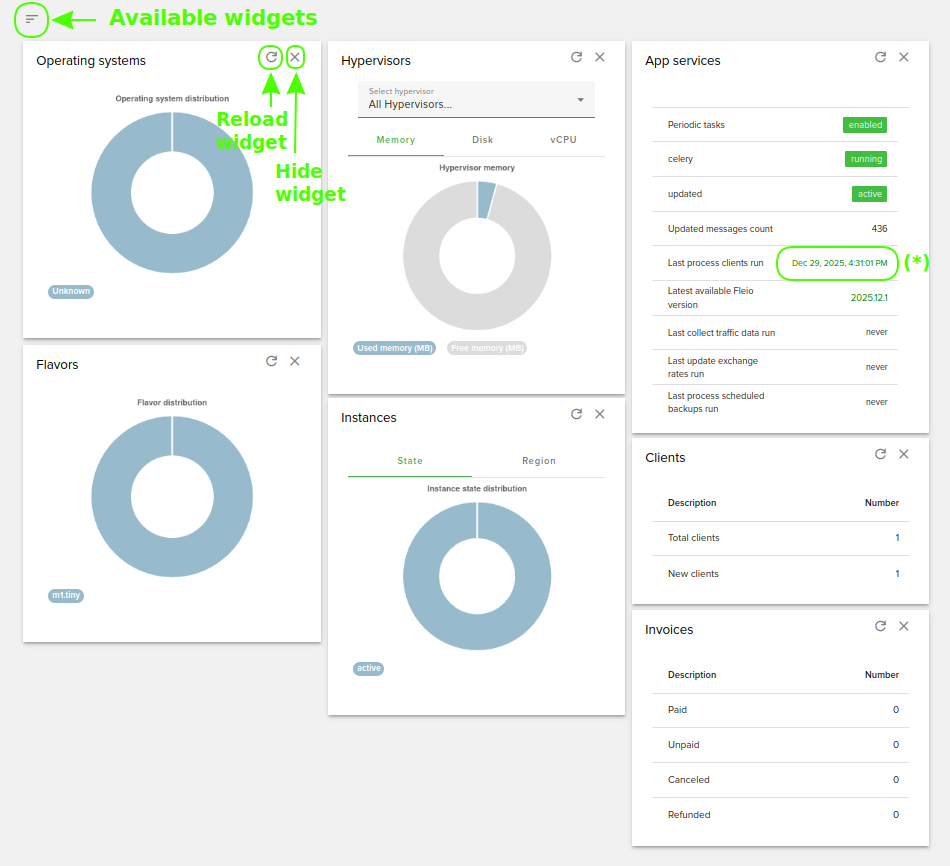
You can reload data from a widget or hide the widget from the panel using the highlighted buttons from the
above image. If you want to add again a widget that you previously hid, you can do so using the button in the top-left corner of the panel, like the one highlighted in the image above.
(*) On the App services widget you will see the last date and hour that cron run. If the date is green, it means that
the cron has run in the last 24 hours. If it’s red then it means that the cron did not run in the last 24 hours and
needs attention.